Southwestern Illinois College (SWIC) is committed to hiring the best qualified candidates to enhance the learning environment for our students and the community we serve. SWIC employees are organized into 12 employee groups, including 8 different unions. These groups include: Administrators, Alternative Transportation System (ATS), Faculty (Adjunct, Full-time and Part-time), Part-Time Non-Union, Physical Plant, Public Safety, SWIC Educational Employees, and Student Workers.
We encourage you to submit your application materials for any open positions which align with your career goals and education/experience (if applicable, minimum qualifications will be listed in the job posting). Please note: SWIC is unable to accept any application materials that are not submitted with your online application.
Apply Online Today!
Prospective Employees
- Click on, “SWIC Jobs Openings”.
- If you are a first-time applicant, click “Create Account”.
- If you are already registered, login to view current openings.
Current Employees
- Login to InfoShare
- Select Employee Self-Service .
- Click on, “SWIC Jobs” to view our current openings.
Student Employment
FWS and RWS
- Click on, “SWIC Jobs Openings”.
- If you are a first-time applicant, click “Create Account”.
- If you are already registered, login to view current openings.
- **NOTE: Please reach out to Financial Aid regarding open positions.**
Other Student
Employment options
FAQs
APPLICATION ATTACHMENTS – On the SWIC Job Openings page, select “My Job Applications” and add the appropriate documents, i.e. certifications, references, licensures, or unofficial transcripts.
BROWSWER COMPATIBILITY – Our job website is designed to run on several web browsers, however, we highly recommend using Google Chrome or Firefox.
CHANGE YOUR PASSWORD – Login to your Account. Click on ‘Account Information” then select ‘Change Password’.
EXEMPT VS. NON-EXEMPT POSITION – Exempt positions are not subject to overtime earnings and non-exempt positions are subject to overtime earnings (Department of Labor- FLSA Exemption).
INTERVIEW – After the search committee has reviewed the pool of applicants and identified who to bring in for an interview, HR will contact the candidate to schedule an interview.
OFFICIAL TRANSCRIPTS – We will need your “official transcripts” prior to date of hire. The transcript can either be mailed to SWIC Human Resources in a sealed envelope (with an unbroken seal from the college/university) OR sent to humanresources@swic.edu via parchment. Please note, any transcript you upload with your application is considered “unofficial”.
SAVE VS. SUBMIT – You must click the ‘Save’ button during the application process to keep the information you have entered. Once you ‘Submit’ your application, you will receive confirmation email. If you do not receive a confirmation email, first check your spam or junk folders. You can also login to your SWIC Job Opening Account and click on My Job Applications to see if your application was properly submitted.
TIMED OUT – The system will automatically time you out after 60 minutes of inactivity during the application process. If this occurs, log back into SWIC Job Opening Account and select “My Job Applications” to continue.
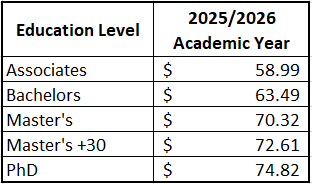
Part-time/Adjunct Faculty Starting Rates per Contact Hour